
DSP means digital signal processing: calculations on the sound during playback. Aède's current DSP changes the playback stream, never the original file or its tags. It does not replace the listening-volume control. Local aede play defaults to without-effects; --playback=dsp or explicit non-neutral effects selects shared processing. Its strict bit-perfect policy instead uses typed source samples and an exact bypass. The authenticated native PCM route keeps its separate processed-PCM contract.
Three local playback modes#
The diagrams show synthetic PCM samples, not a measurement of a device. They describe local aede play; network clients retain their separate playback contracts.
| Mode | Signal illustration | Behavior |
|---|---|---|
Without effects — default, without-effects | 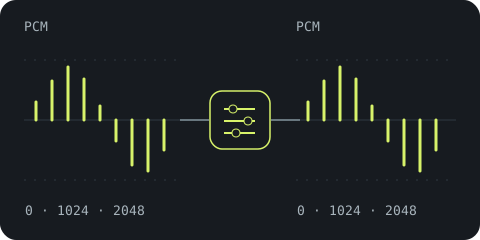 | No selected normalization or tone correction. Prefer the source rate and exact samples; report necessary rate, channel or precision adaptation. This is not a strict bit-perfect guarantee. |
Strict bit-perfect — bit-perfect | 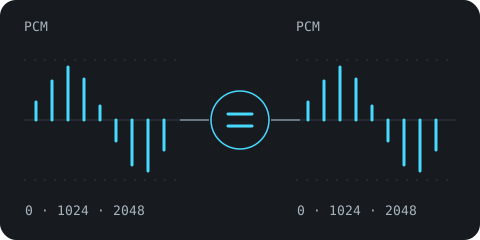 | Preserve the admitted source samples without modifying stages. Refuse incompatible sources or outputs; require an explicit output device. |
DSP — dsp | 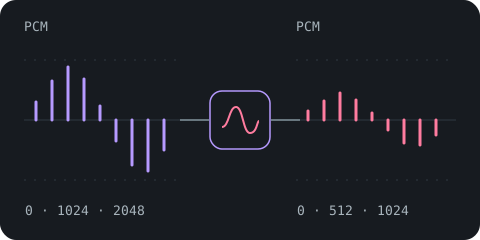 | Apply normalization and chosen tone settings, with headroom, output protection and conversion as needed. Leave original files untouched. |
The initial strict profile accepts native FLAC and integer PCM WAV, 16/24-bit mono/stereo, through direct ALSA on glibc Linux. macOS and Windows are currently refused in strict mode. The software path is implemented and tested; native Linux build/runtime checks and a real digital-return comparison remain pending. See playback policies and strict output for commands, discovery and limitations.
Present FLAC audio MD5 is checked in all three modes, on original decoded integers before any DSP. Its verdict requires complete decoding and does not certify the device output; follow the MD5 diagram and verification states.
Follow a sample from file to output#
- The decoder turns compressed/file audio into PCM: a sequence of numerical samples. Each frame contains one sample per channel; stereo has left and right together.
- Known multichannel layouts can be mapped to stereo, with LFE omitted and conservative scaling.
- The native output chooses a supported sample format/rate; when needed, a stateful bandlimited converter changes the rate.
- A fixed track/album normalization decision changes level, subject to a peak-aware cap.
- Optional broad bass/treble shelves apply their tone correction, with additional headroom for boosts.
- A final sample guard clamps unexpected values outside full scale and reports its interventions.
- Meters observe the submitted PCM; the selected sink sends it to the device. DSP native integer output adds TPDF dither while quantizing; floating output bypasses that conversion.
The order above describes the DSP path. Without-effects skips chosen normalization and tone, prefers the source rate, and avoids dither when a native integer sample is exactly representable; necessary conversion/downmix/protection may remain and is reported. Strict mode bypasses every modifying stage and refuses incompatible sources or outputs. Missing-loudness capture in DSP watches original source PCM before processing, so later normalization does not measure its own gain/EQ as if it were the source. Output metering observes submitted PCM before device conversion. It does not measure your speakers.
The native PCM route also decodes, maps known channels to stereo, applies rate conversion when needed, and uses normalization, tone/headroom and output protection. Its client owns the audio device and final device conversion. Single-track and finite-queue playback reuse existing loudness data without learning new measurements; compatible queue joins share processing state. Subsonic/OpenSubsonic transfers original encoded audio without server DSP; its client owns decoding and any playback processing.
Your current controls#
aede play "An Album"
aede play "An Album" --playback dsp
aede play "An Album" --normalize album --bass 3 --treble -2
aede play /path/to/song.flac --normalize off --bass 0 --treble 0
Replace example names/paths with yours. The local default has normalization off and flat tone. In DSP, automatic normalization uses album scope for catalogued album selections and track scope otherwise; --normalize off|track|album overrides it. Explicit track/album or nonzero bass/treble implies DSP if no policy was specified, and conflicts with explicit without-effects/bit-perfect. Bass/treble each accept −12 to +12 dB, default zero. Zero bypasses the shelves exactly; normalize off alone does not disable an explicitly selected tone correction or the ordinary output guard.
The CLI does not expose a target-LUFS knob, parametric filter editor, limiter, convolution profile, manual resampling rate or dither toggle. Those are not hidden flags to guess. The play command reference covers selections and options; read Output and diagnostics to identify what actually ran.
Start with the question you have#
| Question | Guide |
|---|---|
| Why do two albums play at different levels? | Normalization and measurements. |
| How can I adjust bass or treble? | Tone controls and headroom. |
| What happens to 5.1 audio? | Channel mapping. |
| Why did output change from 96 to 48 kHz? | Rate conversion. |
| Does Aède send untouched integer samples? | Playback policies and integer output. |
| Are album joins gapless? | Continuous playback. |
| What do the moving bars mean? | Spectrum display. |
| Which effects might Premium add? | Future Premium. |
The website's interactive diagrams use synthetic signals to explain these ideas. They are not device measurements or audio-processing controls. The technical implementation/validation is recorded in the DSP review and playback design.