Who plays with whom?
Musicians, composers, producers, groups and members: follow album contributions and artist relationships. For classical music, explore works and their movements too.

AUDIO PLAYER · LOCAL MUSIC LIBRARY
Listen. Explore. Preserve.
Spectrum & pulses · Synthetic signal
Fictional example · Select a relationship
CRC32 · 9AC4 D021CRC32 · 9AC4 D021Verified copy. Original untouched.
Illustration of copying without conversion
Your files, your lyrics. Listening your way.
01 / THE CLI
From your first scan to playback, Aède puts your collection in your hands. Connect credits, find favourites, add context and prepare your files for the road.
“How do I start with my Music folder?”
Explore the commands# Start with your Music folder.
$ aede scan ~/MusicReading files… Building catalog… 3 albums 9 tracks 4 artists Audio and tags unchanged.
Your folders become a catalog of musical connections.
Musicians, composers, producers, groups and members: follow album contributions and artist relationships. For classical music, explore works and their movements too.
Add lyrics, biographies, cover art and portraits to your catalog on demand. Compare a fetched discography with your collection to spot missing albums.
Find a title, lyric or note. Combine years, genres, formats, ratings and musical roles in a query, then export the selection as M3U, CSV or JSON.
Favourites, ratings, tags and Markdown notes stay separate from audio files. Saved collections follow their criteria; listening history keeps track of your plays.
check checks the checksums embedded in FLAC frames and Ogg pages. Identical copies can be read back and compared; after conversion, Aède checks structure and duration.
In the Terminal or through native PCM streaming, Aède checks the MD5 of decoded FLAC audio before any processing, without modifying your files.
Verification completes at the end of decoding, when a checksum is present. Follow the MD5 check.You can also run an analysis withanalyze or import a FlacCompagnon report to see its measurements in track details.02 / THE SERVER
The local server exposes the catalog to clients and centralises scanning and information retrieval jobs.
API, accounts and HTTPS available
Two ways to start: the CLI for scripts, or the Aède app to add folders and run a local HTTPS server connected to Phémios.
Version 0.6.1 in preparation · separate CLI and App downloads at release.
Explore the server appUse a separate key for each application. Browsing and FLAC playback have been verified with Submariner on macOS; check which features your player supports.
Compatible with




SlimProto, UPnP and OpenHome: initial profiles available; real-device validation pending.
Google Cast™: experimental Aède sender with discovery and original-audio playback; real-device validation pending.
Google Cast is a trademark of Google LLC.
NAS, Raspberry Pi and mobile players: validation pending.
Understand the serverCATALOG · LOCAL API03 / THE DSP
Without effects for everyday listening, strict bit-perfect to preserve samples, or DSP to adjust the sound. Your audio files remain untouched in every mode.
Illustrative curve · The original file stays untouched.
Choose how the signal behaves during local CLI playback. Without effects is the default.
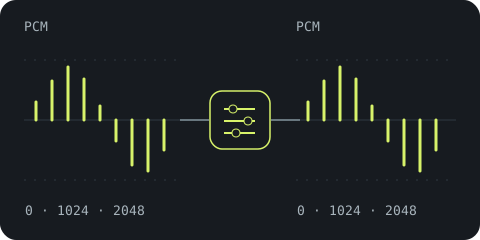
Normalization off, flat bass and treble. Aède prefers the source rate and an exact sample representation.
Rate, channels or precision may be adapted when the output requires it. Interventions are reported: this mode does not guarantee bit-perfect output.
--playback=without-effects
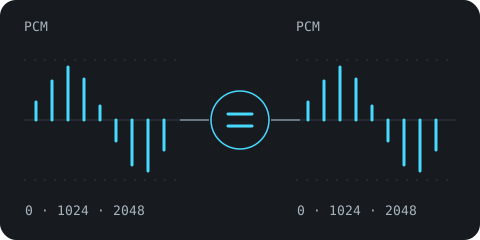
No gain, equalization, resampling, channel mixing or dither. Incompatible sources or outputs are refused.
Initial profile: native FLAC and integer PCM WAV, 16/24-bit, mono/stereo. Direct ALSA output on glibc Linux, with an explicitly selected device.
--playback=bit-perfect
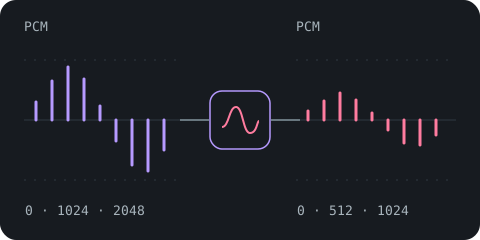
Track or album normalization, bass and treble, headroom and output protection. The signal changes; your files remain untouched.
Choose this mode explicitly or enable a non-neutral setting. In DSP, automatic normalization follows the selection unless disabled.
--playback=dsp
Bit-perfect: the software path is implemented and tested. Building and testing the backend on real Linux, then comparing a digital capture, remain pending. Strict mode currently refuses macOS and Windows.
Synthetic diagrams. These three modes apply to the local CLI; network clients follow their own playback chain.
Choose a mode and outputReplayGain and Opus R128, followed by loudness and true peak measurements from FlacCompagnon when available. Album mode preserves level differences between tracks; track mode suits mixed selections.
Bass and treble act on the decoded signal, with headroom for gain increases. Active stages, peaks and output guard interventions are shown.
In DSP mode, the signal is converted if the output requires another rate. Quantization to an integer output uses dither. The spectrum describes submitted PCM, without measuring the physical DAC signal.
MD5 covers original decoded audio, before any conversion or correction. DSP can then change the sound without changing this reference.
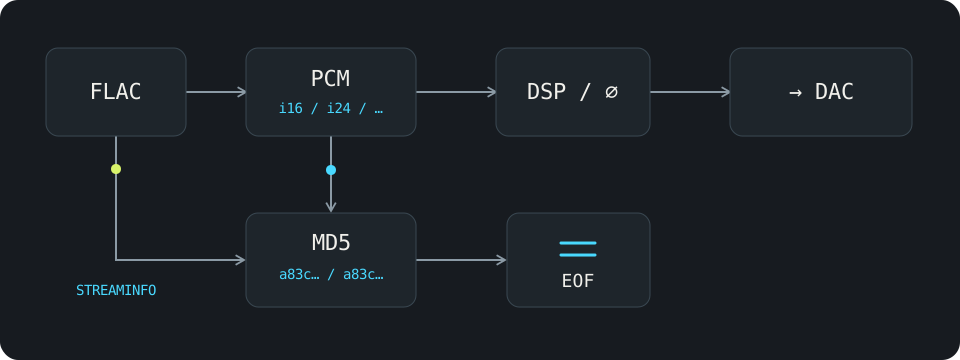
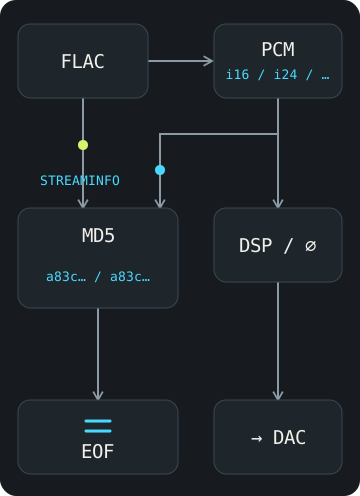
A matching MD5 checks consistency of the decoded source. It does not prove that the system mixer, driver or DAC preserved the samples. WAV and MP3 do not carry this FLAC signature.
The command check separately checks FLAC/Ogg container structure and checksums; it does not decode audio to verify this MD5.
Ideas for progressive development.
Scope, funding and schedule to be defined.
Choose the frequency, gain and width of each filter. Combine bell, shelf, high-pass and low-pass filters, with presets and individual bypass.
Keep different settings for headphones, speakers or an output. Import, export and clearly identify the playback profile.
Apply filters from user-supplied impulse responses. A foundation for personalised correction, with controlled latency and transitions.
All Premium features above are proposals. Priorities and availability remain to be confirmed.
04 / THE GRAPHICAL INTERFACE
The Aède interface.
A client project, the same musical universe.Working name · Concept to develop
Phemius is an aoidos from theOdyssey, who sings in the palace of Odysseus on Ithaca. A name to give Aède a face.
ALBUM · 2024
CONNECTIONS IN YOUR COLLECTION
YOUR SELECTION
Simple typography · Monospace measurements · Short motions · Visible sources
WE WRITE THE NEXT CHAPTER TOGETHER.
Receive Aède news and the announcement of its future Kickstarter launch.
At most one email per month. No spam.
Unsubscribe by replying.